
DFRobot’s DFPlayer mini is a small, inexpensive MP3player module and the info page for it lists some of its uses as:
- Railway station, bus safety inspection voice prompts;
- The public security border control channel voice prompts; and
- Multi-channel voice alarm or equipment operating guide voice.
Anyway, this post is not about using it for that, but it did remind me of those announcements in stores like, “Security to sector 2”. The first time I heard one of those it was a quiet Sunday morning and I was the only customer in the store. I looked around to see if a staff member was headed my way but they all seem to be going about their business. It was a bit disconcerting.
In the last year I’ve made two projects based on the DFPlayer mini and neither used a microcontroller. The circuit diagram for both was very similar to the AD KEY Mode circuit on the info page. The DFPlayer has two pins that when temporarily connected to ground via button switches and resistors allow up to 14 different tracks to play.
Book with track buttons
The first project was for an audio player to be incorporated into a project book. The book included a section about French music. As the reader went through pages there was text about samples, for example, “Press 1 to hear an example of Groups Folkloriques”. The player was built into the front cover with a button for each example and another to stop play.

I did make a few changes to the DFRobot circuit. Buttons for only 12 MP3tracks were included. A button for Play/Pause was also added as the tracks were long and we wanted a way to stop playback.
I used surface mount resistors, but didn’t have a 24K resistor for segment 10 so used a 22K resistor which seems to work without issue.
I also added a volume limiting resistor in series with the speaker of around 10 – 20 ohms as the speaker was being driven quite hard.
This is how it turned out. We discussed trying to place a button within the pages, but that didn’t seem practical. It works fairly well, but the small speaker is a significantly limiting factor. With a decent speaker in a case the sound quality is massively better.

Sound effects machine
I wanted to build a sound effects machine that played one of 11 files. The components and buttons to be built into a small project box, with the it and a 3 x 1.5 AA battery box mounted on a small speaker.
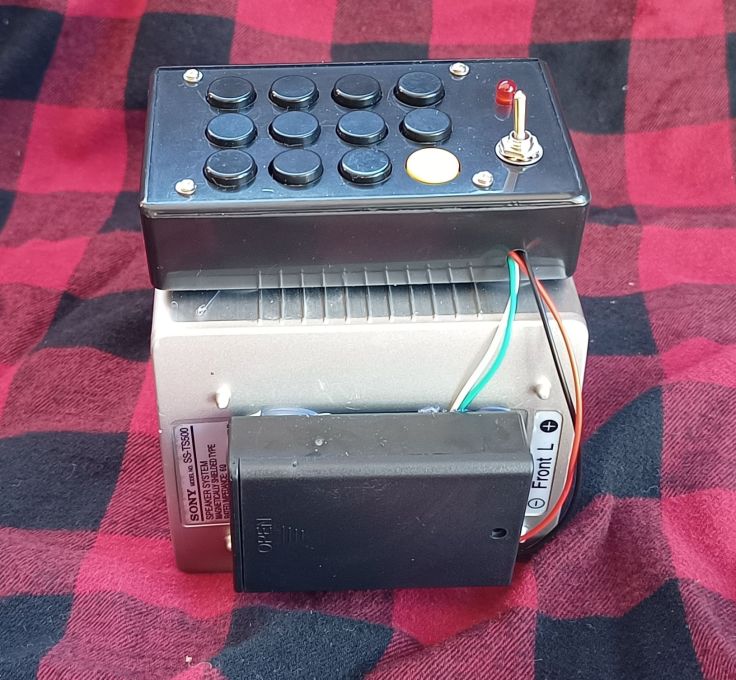
I found soldering surface mount resistors on the protoboard to be very difficult with the book project. I had used those as I didn’t have through hole resistors for the values needed. For this project I wanted to test an idea. Instead of the current flowing through a single resistor when a button is pushed, I modified the circuit so there is a ladder of resistors and current goes through all the resistors below in the ladder when a button is pressed. I was able to get it to work with these common value resistors.

The buttons were mounted on to a 50 x 70mm protoboard. I was able to fit 12 buttons and resistors were added as in the diagram below.

This is a diagram of the back of the circuit board with switches and resistors

When the buttons and resistors were wired up and tested, the pins on one side of the DF Player were bent up and soldered into the protoboard. Wiring was connected up as below. It worked well, but was very loud. I added a 47 ohm resistor in series with the speaker to reduce the volume. That is probably not good design practice. I’m interested in hearing from anyone with knowledge about this.

Click on the image for higher resolution

A note about file naming. The MP3files were named with 3 digits at the start, for example “001 first file.mp3” and placed in the root directory of the SD card. However, the numbering didn’t have any effect. The files aligned with the button based on the order that they were copied to the SD card.
I’m fairly satisfied with this project. his little module works surprisingly well without a microcontroller. The silicone wiring I got from AliExpress has made it much easier to solder up. The sound is very good and I was able to satisfy my curiosity about wiring the buttons.

Other potential uses
There are probably lots of other uses the module could be used this way. One I have considered is a security alarm device with buttons that play deterrent type noises that can be played if a break-in is under way. A number with dog barking sounds, sirens, angry yelling and that sort of thing.
The ability to have a button for each track is a cool feature of this module. Maybe this post will give you a few ideas for a project.
 Garry's blog
Leave a comment